The following notes provide guidance in checking the operation of injection locking of an IC9700. The notes are specifically aimed at users of the RefGen-9700 module (see https://brisbaneradiosociety.net/keeping-your-ic9700-locked/) but may be used to check any 49,152MHz injection lock system for the IC9700.
Other notes in “Techniques” explain the IC9700 stability issues https://vk4amg.blog/refgen-9700-frequency-stability/ and explain the operation of injection locking to provide high accuracy and stability for the IC9700 https://vk4amg.blog/injection-locking-ic9700/.
One measure of effective injection locking in an IC9700 is the range of REF Adjust in which the radio is locked to frequency. If the lock range is only a few percent, the IC9700 VCXO may tune beyond that range with temperature change resulting in unstable and inaccurate frequency.
It is not normally a concern, where the Ref Adjust values in the range check are asymmetrical (45% / 65%) as long as the AutoSync sets the RefAdjust in the middle of that range (55%). Widely asymmetrical combined with narrow injection lock range should be investigated.
Operation Check
If you are interested, the correct operation of the injection locking may be checked by cancelling the auto sync (Figure 1).
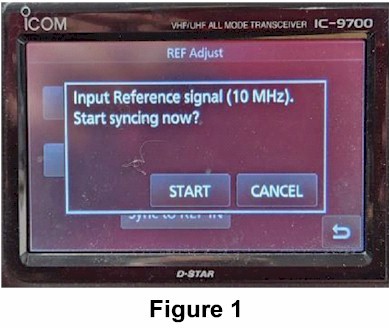
Adjust the “fine” to around 50%. Not critical, but it provides a reference point.
Tune to a stable signal e.g. GPS lock beacon on any band in USB so the audio is centred in the bandwidth, say, 1000Hz.
Proceed via the <Menu>, <Set>, <Function>, to the Ref Adjust screen (Figure 2). If the auto sync is turned on, press <Cancel Sync>. Note the coarse and fine values.
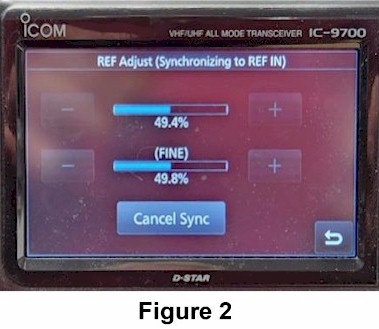
Press the coarse <+> in steps until the tone of the received signal starts to wobble. Note the displayed value e.g. 55%.
Press the coarse <-> in steps until the tone of the received signal starts to wobble. Note the displayed value e.g. 45%.
Lock Range
The strength of the injection lock is indicated by the range e.g. 10% (difference between these results e.g. 55% and 45%).
The average of the coarse % in these steps should be approximately the value noted when the auto sync was cancelled. The REF Adjust should be set to the average, e.g. 50%.
Return the coarse value to that noted in auto sync or the average noted above. Auto sync may then be restored by pressing <Sync to REF IN> and responding “yes” (Figure 3).

Auto Sync Check
Where 10MHz external reference is used to Ref In and AutoSync is On, compensation by the auto sync may be checked by “Starting the Input Reference signal then switch off the IC9700. Switch on the radio and allow your 10MHz reference to stabilize. The REF Adjust (Synchronizing to REF IN) screen (Figure 2) will show where the radio syncs to the 10MHz Ref In.
Do not just switch on the 10MHz RefIn when the 49.152MHz generator is injection locking the radio. Values in Figure 2 may be incorrect.
 VK4AMG